

Appearance
Complete Your Brand Profile Step by Step
Your brand's DNA determines the quality of every recommendation, every piece of content, and every image Brande.ai generates.
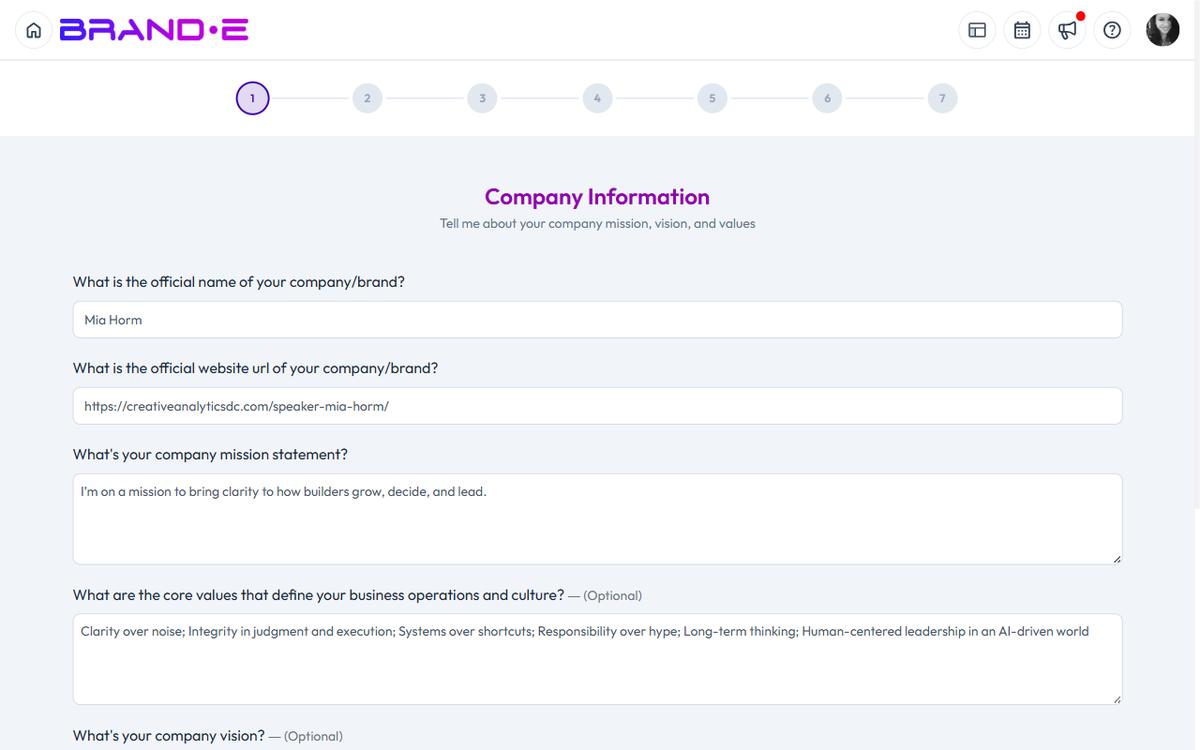
Weak Brand DNA creates generic output, low engagement, and early product abandonment.
A complete Brand Profile transforms Brande.ai from a tool into a content engine that understands your market position and speaks directly to your audience.
What You'll Need
- A Brande.ai account (any plan)
- 3–5 examples of your brand voice (website copy, LinkedIn posts, or a brand guidelines doc)
- 15 minutes
Why Brand Profile Setup Matters
Content generation is only as good as the information behind it.
When you provide clear, specific answers to onboarding questions, Brande.ai:
- Extracts your actual brand voice (not AI-invented voice)
- Understands your specific audience triggers
- Recommends content aligned with real business goals
- Generates images that match your visual identity
- Avoids costly revisions and rejections
When answers are vague, generic, or incomplete:
- Output feels corporate and inauthentic
- Content misses your audience's pain points
- Image generation doesn't match your brand
- You waste time editing instead of publishing
The onboarding wizard lives at /onboard and walks you through seven steps over about 15 minutes.
You can update any section later in your Brand Profile page (Account sidebar, brand owner only).
The Seven Onboarding Steps
Step 1: Company Information
What you enter: Brand name, website URL, company mission, core values, and company vision.
Why this matters: Brande.ai uses this foundational context to set the tone for everything it generates. A clear mission and vision ensure recommendations align with where your company is headed.
Good answers look like:
- Brand name: Clear and exact (the name you publicly use)
- Mission: One or two sentences on what you do and for whom
- Core values: 3–5 principles that guide your team and brand behavior
- Vision: Where the company will be in 3–5 years
Weak answers look like:
- Vague mission ("we help companies grow")
- Generic values ("innovation, integrity, customer focus")
- Missing vision or URL
Step 2: Brand and Product Positioning
What you enter: Brand personality, unique selling proposition (USP), problem you solve, key product features, and key product benefits.
Why this matters: Content Agent uses your USP and differentiators to recommend content that highlights what makes you different. Every piece of content should reflect your positioning.
Good answers look like:
- Personality: Specific descriptors ("direct, slightly irreverent, warm but not fluffy")
- USP: One sentence that a skeptic can immediately understand
- Problem solved: What your customer suffers from before finding you
- Features vs. benefits: Features are what it does; benefits are what that means for the customer
Weak answers look like:
- Generic personality ("professional and friendly")
- USP that could apply to any competitor
- Benefits listed as features ("real-time dashboard" instead of "know what's happening before your boss asks")
Step 3: Customer Research
What you enter: Ideal customer profile, audience needs and challenges, purchase triggers, and gravity of problem.
Why this matters: Brande.ai references this in every piece of content. Content Agent uses it to recommend topics that resonate. The "gravity of problem" field tells the AI how urgent the pain is—crucial for tone calibration.
Good answers look like:
- Ideal customer: Specific role, company size, and situation ("VP of Product at seed-stage SaaS, overwhelmed by roadmap requests")
- Needs: What they're actively trying to achieve
- Purchase trigger: What specific event makes them finally act ("board pressure to show product-led growth metrics")
- Gravity: High urgency ("losing customers to a faster competitor") vs. low ("nice to have someday")
Weak answers look like:
- Too broad ("anyone who needs our product")
- Missing the trigger (why now do they care?)
- Generic pain ("they want to save time")
Tip: Look at your best customer. Why did they buy? What was happening in their world when they needed you? That's your audience trigger.
Step 4: Competitive Analysis
What you enter: Up to 3 competitor URLs and your company differentiators.
Why this matters: Brande.ai uses competitive context to position your content relative to the market—emphasizing what sets you apart and avoiding language that sounds like everyone else.
Good answers look like:
- Real direct competitors (not category leaders if you don't compete with them)
- Differentiators that are actually different, not generic ("we have better support" needs evidence)
Weak answers look like:
- Listing aspirational competitors instead of actual ones
- Generic differentiators ("we're easier to use," "we're more affordable")
Step 5: Content Strategy and Creative Briefs
What you enter: Content distribution channel selection and creative brief preferences.
Available channels: Blog, Podcasts, Paid Ads, Email, Facebook, Instagram, Twitter (X), LinkedIn, TikTok, YouTube, Pinterest, Snapchat, Discord/Communities
Why this matters: Content Agent generates one brief per selected channel per day. The channels you choose here determine which recommendations appear on your dashboard. If you omit a channel, Content Agent won't recommend for it.
Good answers look like:
- Select 2–4 channels where your audience actually spends time
- Choose channels where you can commit to consistent publishing
- If unsure, LinkedIn and Blog are safe defaults for B2B
Weak answers look like:
- Selecting all channels (dilutes focus, overwhelming to execute)
- Selecting channels you don't actually use ("we might do TikTok someday")
Tip: You can update channels later in your Brand Profile. Start with where you know you'll publish regularly.
Step 6: Public Stances and Legal Considerations
What you enter: Topics your brand publicly takes a position on, and any legal constraints on your content.
Why this matters: Prevents Content Agent from recommending content that conflicts with your stated positions or creates legal risk. Useful for regulated industries (finance, healthcare, legal) or politically sensitive brands.
Good answers look like:
- Specific stance ("we publicly support remote work and call it out in our content")
- Clear restrictions ("we cannot make specific ROI claims without a disclaimer")
- Industry compliance notes ("must not give specific investment advice")
Tip: If your brand has no strong public stances or legal constraints, brief answers are fine. Don't over-constrain the AI unnecessarily.
Step 7: Content Preferences and Restrictions
What you enter: Tone preferences, content format preferences, and topics or approaches to avoid.
Why this matters: Fine-tunes the voice and format of everything Brande.ai generates for your brand. This is where you rule out clichés, preferred content length, and anything that feels off-brand.
Good answers look like:
- Tone: "Conversational but authoritative. No corporate speak. No motivational poster language."
- Format preferences: "Long-form for blog, short punchy for LinkedIn. Always use bullet points for steps."
- Restrictions: "Never use buzzwords like 'synergy', 'pivot', 'holistic'. No rhetorical questions as openers."
Weak answers look like:
- Vague preferences ("keep it professional")
- No restrictions (the AI will default to safe but generic choices)
The Analyzer Step
After you enter text, file, or media inputs, click Analyze.
Brande.ai extracts your voice characteristics and generates a summary: tone, storytelling style, emotional voice, key messaging patterns.
Review the analysis and click Save Analysis if it feels accurate.
If something is wrong ("we're not always motivational"), you can re-enter inputs or edit the analysis manually.
This step takes 30 seconds to 2 minutes depending on file size.
What Happens Next
Once you complete the wizard, you are redirected to /onboard-success.
From there:
- Go to your Brand Profile (Account sidebar → Brand Profile) to review or update answers anytime
- Check Content Agent (Content Opportunities sidebar) to see what Brande.ai recommends you create first
- Create your first project (Alt+N) using a Content Agent recommendation
Update Your Brand Profile Over Time
Brands evolve.
As your product, positioning, or audience changes, update your Brand Profile:
- Brand Voice (Step 2 & 7): Add new voice examples quarterly. When your voice shifts, update tone preferences.
- Business Objectives & Positioning (Steps 1–2): Update annually or when strategy changes. Content Agent watches this closely.
- Customer Research (Step 3): Revisit when you learn new customer insights.
- Channels (Step 5): Add or remove as your distribution strategy changes.
- Competitive Analysis (Step 4): Update when the competitive landscape shifts.
Outdated inputs create outdated outputs.