

Appearance
Create Facebook Thread Posts
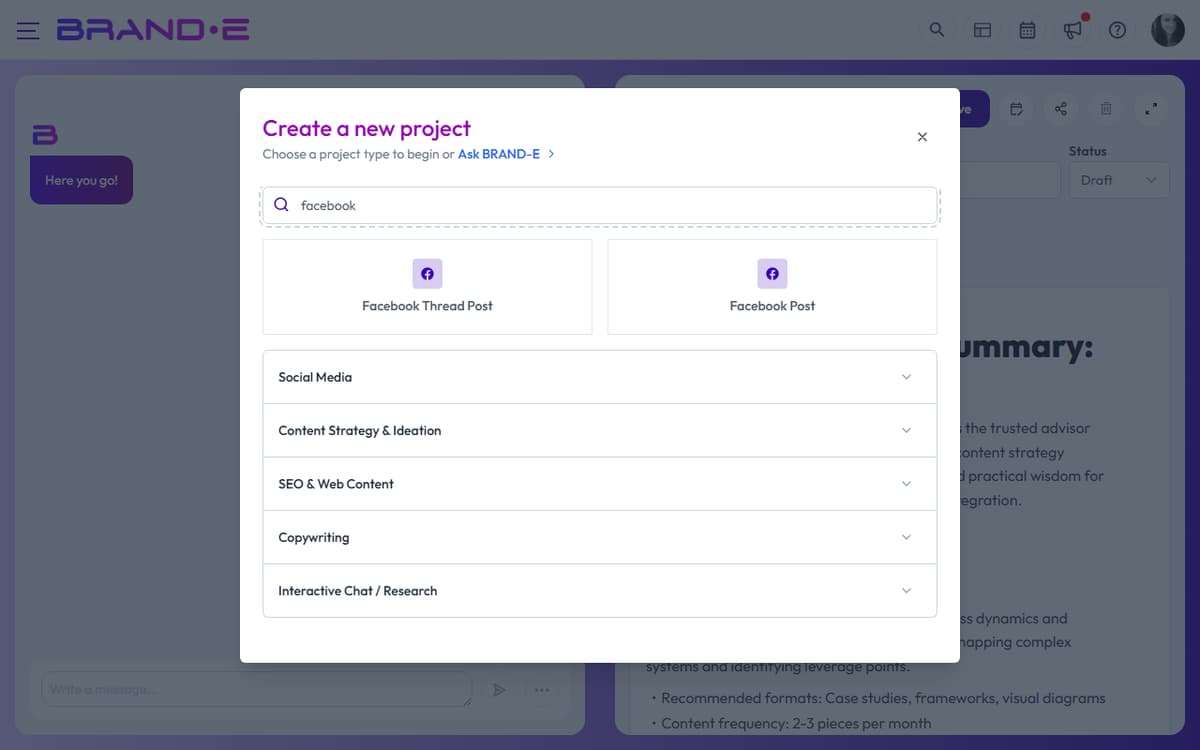
Facebook thread-style content has its own dedicated template in Brande.ai — Facebook Thread Post — alongside the regular Facebook Post template. Both are in the Social Media template category.
Note: "Facebook Thread Post" is Brande.ai's template name for multi-part, sequential content published to Facebook. This is not related to Meta Threads (threads.net), which is a separate app. If you want to create content for Meta Threads, use the Facebook Thread Post template and adapt the copy for that platform.
Thread-style posts on Facebook build a narrative across connected updates. Threads are easy to misfire without structure: too long and they're ignored; too short and they feel incomplete. Content structured with your Brand DNA ensures each thread performs as strategy, not as a shot in the dark.
What Is a Facebook Thread Post?
A Facebook thread post is a series of connected updates that build on each other:
- Thread post 1 — Hook the reader (pain point, question, or curiosity gap)
- Post 2–4 — Support the hook with evidence, data, or story
- Final post — Call-to-action or conclusion
Readers see the entire thread on your profile and in feeds where you tag it as a "thread." Followers can like, comment, and share the entire thread, not individual posts.
Why Threads Matter for Brand DNA
Generic threads feel like corporate broadcasts. Brand DNA-informed threads feel like conversations from someone your audience trusts.
When you use the Brand DNA from your profile (your voice, your audience, your business objectives), your threads:
- Open with your audience's pain point — Not a generic statement
- Use your actual voice — Not LinkedIn-professional robot voice
- Build credibility with specific context — Not vague promises
- End with a clear next step — Not a buried CTA
When to Use Facebook Threads
Use threads to:
- Build thought leadership and establish expertise
- Tell customer success stories (multi-part narrative)
- Unpack complex topics into understandable steps
- Respond to industry news or trends (multiple perspectives)
- Share data-driven insights (setup, findings, implications)
- Educate your audience about your methodology or process
Do not use threads for:
- Single announcements (use a standard post)
- Quick tips or hot takes (use LinkedIn Post template)
- Urgent time-sensitive information (use a standard post)
- Promotional/sales content without educational value
How to Create a Facebook Thread
Step 1: Start a New Project
Click Create New Project (Alt+N / Ctrl+N). The project type dialog opens.
Search for "Facebook" or browse the Social Media category. Select Facebook Thread Post (the series-style template). The single-post Facebook Post template is available right next to it for one-off posts.
Step 2: Configure Variables
Provide context:
Thread Topic (required) What is your thread about? Example: "Why hiring for attitude is smarter than hiring for skill fit"
Thread Hook/Opening How do you open the thread? What's the hook that makes readers want to see more? Example: "Most founders hire for experience. Here's why that's backwards."
Main Points (required) List 2–4 key points or story beats that make up the thread. Example:
- Skill transfer takes 6 months; culture fit takes 2 years
- My hiring mistake (personal story)
- How to interview for attitude
- CTA: Share your hiring philosophy
Target Audience Remind the AI of your primary audience so the thread speaks to them directly. Example: "SaaS founders at 5–50 person stage"
Brand Voice Select which voice profile to use. Your thread will match that voice throughout all posts.
Reference Material (optional) Attach a case study, customer story, or past thread to reference for tone and structure.
Folder (optional) Organize the project into a folder (e.g., "Thought Leadership," "Q1 2024").
Step 3: Generate the Thread
Click Done. The editor opens and the AI generates the full thread as a series of connected posts.
You'll see:
- Post 1: Hook (50–80 words)
- Post 2: First supporting point (60–100 words)
- Post 3: Second supporting point (60–100 words)
- Post 4+: Remaining posts + CTA
Each post is designed to stand alone but also connect to the next. The tone and voice remain consistent across all posts.
Step 4: Refine in Chat
Use the chat interface to adjust:
"Make the hook shorter and more controversial" The first post becomes punchier and gets more engagement.
"Add a customer quote in post 2" The AI rewrites post 2 to include social proof.
"Expand the CTA—I want them to leave a comment with their take" The final post becomes more conversational and engagement-focused.
"Tone down the corporate language" The entire thread becomes more casual and authentic.
"Add a third supporting point" The AI inserts a new post mid-thread while maintaining narrative flow.
Step 5: Copy to Facebook
When the thread is ready:
- Export to PDF or Word (three-dot menu) for sharing with collaborators
- Copy each post directly from the editor
- Paste into Facebook Creator Studio as individual posts, linked as a thread
Or copy all posts to a document for your social media manager to post.
Step 6: Set Status and Publish
Change project status to Approved (ready to post) or Published (already live).
Monitor thread engagement in Facebook Insights. Strong threads get higher reach and comments—notes for future iterations.
Facebook Thread Best Practices
Best Practice 1: Open with pain, not credentials Readers care about their problem first. Your credibility comes after you prove you understand their problem.
Example opening:
- Weak: "As a fractional CMO with 10 years experience, here's how to scale your team"
- Strong: "Scaling your team costs 3x more than you budget. Here's why."
Best Practice 2: Keep post length 50–100 words per post Facebook Threads reward brevity. Each post should feel like a quick read, not a paragraph.
Best Practice 3: Use line breaks Break posts into 2–3 short paragraphs instead of one block. Easier to scan and read on mobile.
Best Practice 4: End early posts with curiosity Each post should make readers want to read the next one:
- "Here's where I went wrong..." (setup for next post)
- "Most people miss this..." (curiosity gap)
- "Only then did I realize..." (narrative momentum)
Best Practice 5: Data or story, not opinion Threads that back up claims with data or personal stories get more engagement than opinion threads.
Example:
- Weak thread: "Hiring attitude is better. I believe this."
- Strong thread: "Hiring attitude is better. Here's the data... Here's what happened in my hiring..."
Best Practice 6: CTA should match thread type
- Educational thread: "What's your take? Leave a comment below."
- Narrative thread: "Have you been in this situation? How did you handle it?"
- Promotional thread: "Ready to solve this? Here's how."
Example: Fractional CMO Thread
Topic: "Why fractional CMOs fail in the first 90 days"
Hook Post (Post 1): "Most agencies hire a fractional CMO and wonder why nothing changes in 90 days. It's not because the CMO isn't good. It's because they started with the wrong foundation."
Supporting Post (Post 2): "The mistake: jumping straight into campaign planning. The right move: spend 30 days on brand DNA, audience mapping, and channel audit. Strategy before tactics."
Supporting Post (Post 3): "Example: My last engagement, the founder wanted social media content immediately. We paused. Spent 3 weeks understanding their audience. The content that came after got 10x engagement."
CTA Post (Post 4): "Before hiring a fractional CMO—or if you're in month 1–3—audit your foundation. Do you have brand clarity? Do you know your audience? That's where the win lives. Reply with what you're uncertain about."
Refine in chat:
- "Make post 1 punchier. I want it to stop someone scrolling."
- "Add data in post 3. Give me actual engagement numbers."
- "Soften the CTA. Make it conversational, not salesy."