

Appearance
Use Content Agent Across Client Accounts
Each client brand has its own Content Agent that generates personalized recommendations.
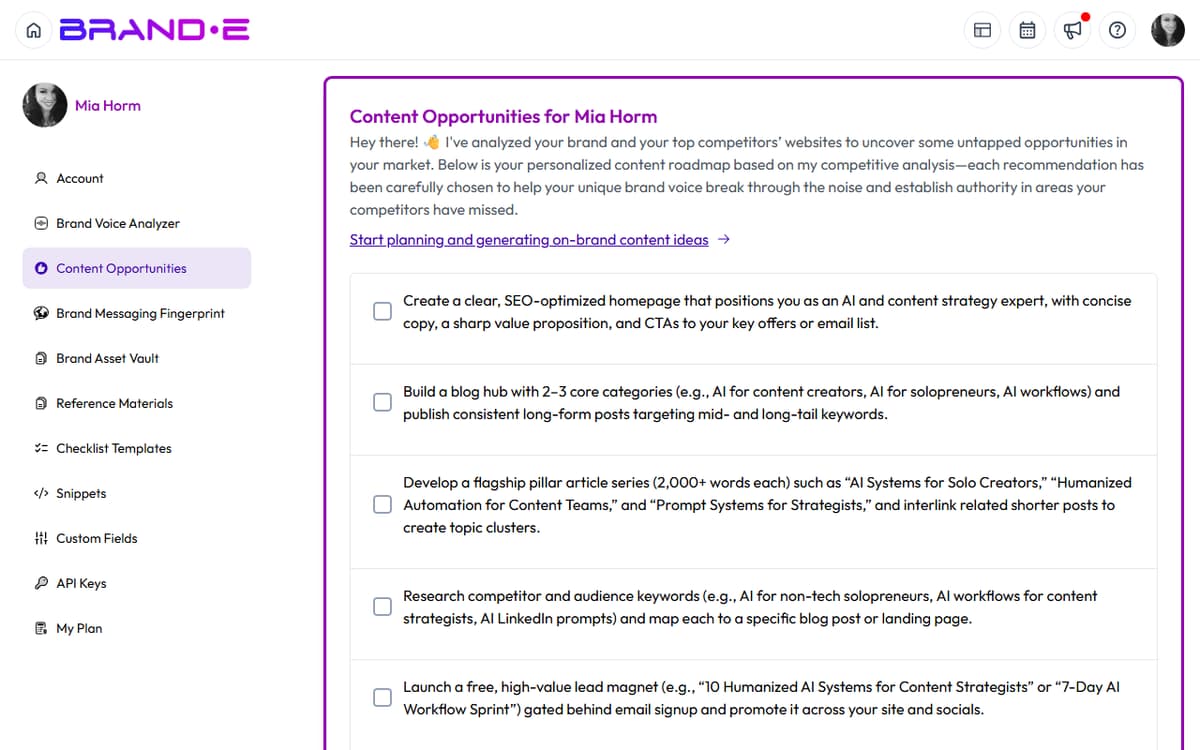
Switch brands, and Content Agent instantly generates a new set of topic recommendations tailored to that brand's specific DNA, audience, and objectives.
How Content Agent Works Per Brand
Content Agent analyzes each brand independently:
Client A Brand DNA:
- Audience: VP of Product at seed-stage SaaS startups
- Objective: Establish thought leadership in product management
- Channels: LinkedIn, Blog
- Recommendation: "Create a LinkedIn post about navigating product pivots" (specific to their audience and goal)
Client B Brand DNA:
- Audience: E-commerce brand owners selling on Shopify
- Objective: Drive sales through email and paid ads
- Channels: Email, Facebook, Instagram
- Recommendation: "Write an email sequence about upselling your existing customers" (specific to their audience and goal)
Each brand's Content Agent runs independently. One brand's recommendations do not affect another brand's recommendations.
View Content Agent Recommendations Per Brand
On the Dashboard
- Click profile icon (top right) > select a brand from the Brands dropdown
- Go to Dashboard (Ctrl/Alt+H or from sidebar)
- Look for the "Content Agent: Your Strategic Content Recommendations for Today" widget
- You see personalized recommendations for that brand
Switch to a different brand:
- Click profile icon > select another brand
- Go to Dashboard again
- You see that brand's Content Agent recommendations (completely different from the previous brand)
In Content Opportunities
- Click profile icon > select a brand from the Brands dropdown
- Open Account sidebar (Ctrl/Alt+A)
- Click Content Opportunities
- You see all recommendations (past and pending) for that brand
Switch to another brand:
- Click profile icon > select a different brand
- Go back to Account > Content Opportunities
- You see only that brand's opportunities (not the previous brand's)
Understanding Per-Brand Recommendations
Content Agent generates recommendations based on:
Brand Profile (Brand DNA)
- Business objectives — What you're trying to achieve
- Audience triggers — Who you're trying to reach and what moves them
- Content channels — Where you publish
- Brand voice examples — How you communicate
Channel and Timing
- Recommendations align with channels you selected
- Email recommendations only appear if Email is a selected channel
- LinkedIn recommendations only appear if LinkedIn is selected
Plan Level
- Some plans limit recommendation frequency or count
- Agency Plan provides unlimited recommendations per brand
Example: Cross-Client Recommendations
Let's say you manage three agencies clients:
Brand A: B2B SaaS Marketing Agency
Audience: Fractional CMOs Channels: LinkedIn, Blog Objective: Drive fractional CMO leads to consultation booking
Content Agent recommends:
- "Create a LinkedIn post about the 3 biggest marketing mistakes fractional CMOs make"
- "Write a blog post: Fractional CMO vs Full-Time CMO — when to hire which"
- "Build an email sequence for interested fractional CMOs"
Brand B: Shopify E-Commerce Store (Fashion)
Audience: Female clothing buyers, ages 25-45 Channels: Instagram, Email, Facebook Objective: Drive repeat purchases and increase average order value
Content Agent recommends:
- "Create an Instagram Carousel post showcasing your best-selling styles"
- "Write an email about seasonal fashion trends and curated recommendations"
- "Design a Facebook ad targeting previous customers with new collection announcement"
Brand C: SaaS Accounting Software
Audience: Bookkeepers and accountants Channels: LinkedIn, Webinars, Blog Objective: Establish thought leadership in accounting automation
Content Agent recommends:
- "Create a LinkedIn poll about biggest accounting bottlenecks"
- "Design a webinar outline on automating small business accounting"
- "Write a blog post on compliance updates for accountants in 2024"
Each brand's Content Agent is context-aware and generates recommendations that align with that specific brand's market position, audience, and goals.
Creating Content from Per-Brand Recommendations
Once you see a recommendation for a specific brand:
- Stay in that brand's context (it should still be selected)
- Click the "Go to Project" button (if a project already exists) or "Customize Content" button
- The new project dialog opens within that brand's context
- Choose a template or customize variables
- Generate content
The content is created within that brand's project library and uses that brand's Brand DNA for generation.
When you click Customize Content on a recommendation, Brande.ai pre-fills the variable dialog using the recommendation's brief, then opens the standard project-creation flow. You can edit any field before clicking Generate.
Regenerating Recommendations Per Brand
To generate fresh recommendations for a specific brand:
- Switch to that brand (click profile icon > select brand)
- Open Account sidebar > Content Opportunities
- Click the "Regenerate" button
- Content Agent analyzes that brand's DNA and generates new recommendations
Regeneration is instantaneous and does not affect other brands' recommendations.
Use Regenerate when:
- You just updated a client's Brand Profile and want to see new recommendations
- You've completed most recommendations and need fresh ideas
- You want to explore different content angles for a brand
Plan Limits on Recommendations
Your plan determines how many recommendations per brand:
- Free Plan — No recommendations
- Starter Plan — Limited recommendations per brand (e.g., 5/month)
- Pro Plan — Expanded recommendations per brand (e.g., 15/month)
- Agency Plan — Unlimited recommendations per brand, per client brand
If you hit your plan's recommendation limit, you see: "You've reached your monthly recommendation limit. Upgrade your plan to unlock more."
Click Upgrade Now or regenerate next month.
Best Practices for Multi-Client Content Agent
Update Brand DNA When Client Strategy Changes If a client shifts their positioning, audience, or objectives, update their Brand Profile immediately. Content Agent's next run will generate aligned recommendations.
Use Recommendations as Starting Points, Not Final Copy Content Agent recommends what to create, not the exact content. Use recommendations as topic briefs, then customize based on current events, client feedback, or recent wins.
Batch Recommendations Across Brands Review all client Content Agent recommendations once per week:
- Monday morning, review dashboard
- Switch between brands, collect all recommendations
- Create a content calendar entry for the week's recommended content
- Start creating projects
This batch workflow is more efficient than checking each brand separately.
Track Which Recommendations Drive Results Over time, note which Content Agent recommendations your clients love and which fall flat:
- Recommendations that convert: "Topic X generates 20% CTR on LinkedIn"
- Recommendations that flop: "Video recommendations rarely get completed"
Use this insight to update Brand DNA (if the recommendation was off-brand) or refine your content strategy.
Troubleshooting
Q: A brand shows "No recommendations available" on the dashboard. A: This happens if:
- The brand's Brand Profile is incomplete (missing objectives, audience, or channels)
- The brand's plan doesn't include recommendations
- The daily generation hasn't run yet for that brand's time zone
Complete the Brand Profile and check your subscription plan.
Q: Content Agent gives the same recommendations for two different brands. A: This usually means the two brands have similar Brand DNA. Review their profiles:
- Are the objectives different?
- Is the audience truly distinct?
- Are the channels different?
If the brands are similar, similar recommendations may be appropriate. If they should be different, update the Brand Profile to clarify differentiation.
Q: Can I delete recommendations I don't like? A: Recommendations only support a binary done/pending status today. There is no "not relevant" or hard-delete action — mark unwanted recommendations as Done to clear them from the active list, then regenerate to load fresh ones.