

Appearance
Upload Brand Assets
Brand assets are documents, images, videos, and links that define your brand visually and strategically.
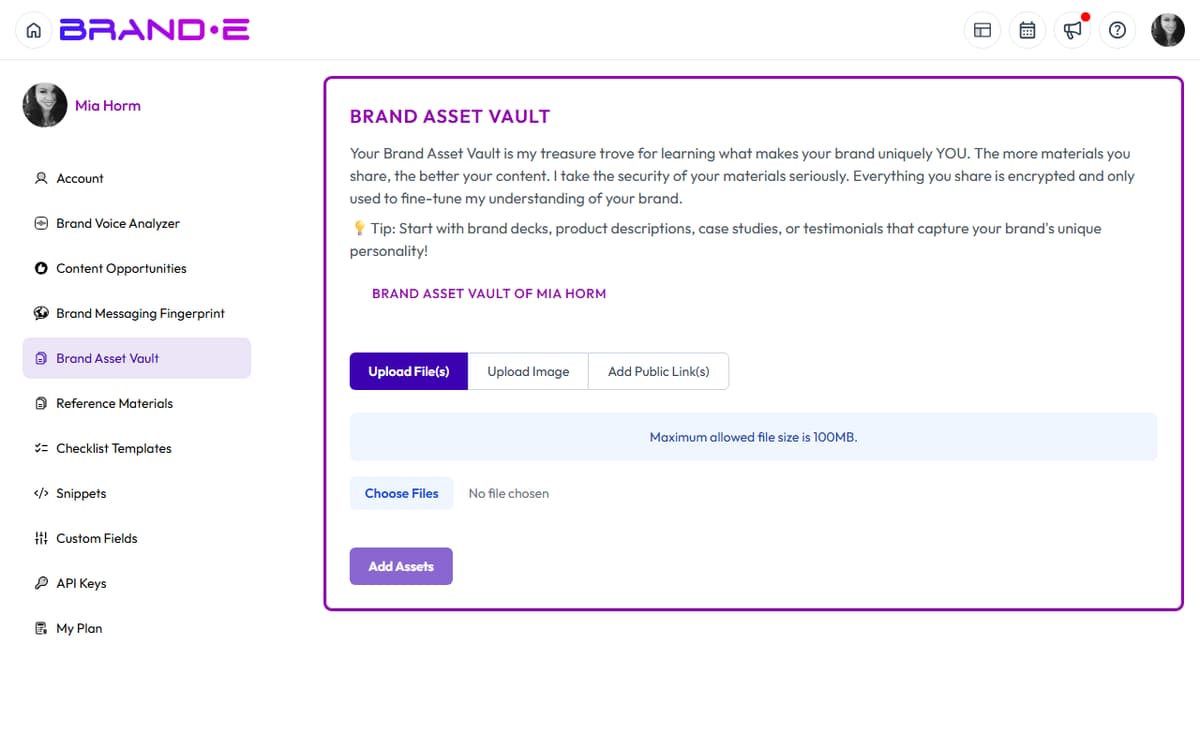
Uploading high-quality assets strengthens your Brand DNA and improves every piece of content and image Brande.ai generates.
What Brand Assets Are
Brand assets include:
- Documents: Brand guidelines, one-pagers, marketing plans, company handbooks, pitch decks
- Links: Website pages, LinkedIn profile, published articles, case studies
- Videos: Founder videos, brand videos, customer testimonials, product demos
- Images: Logo, visual style reference, color palette examples, past marketing campaigns
Think of brand assets as the raw materials that define your brand.
The more examples you provide, the better Brande.ai understands your identity.
Where to Upload Assets
Navigate to Account → Brand Asset Vault.
You'll see a file upload area with options:
- Drag and drop files directly into the upload zone
- Click to browse and select files from your computer
- Paste a link to reference URLs without uploading
Supported file types: PDF, Word, images (PNG, JPG, WEBP), video (MP4, MOV), audio (MP3, WAV)
File size limit: 5 MB per file
Types of Assets to Upload
Brand Guidelines Document (Priority 1)
If you have a brand guidelines PDF, upload it.
Brande.ai extracts:
- Logo specifications
- Color palette
- Typography
- Tone of voice guidance
- Visual style (minimalist, bold, elegant, playful)
- Do's and don'ts
What good brand guidelines contain:
- Logo lock-ups and minimum sizes
- Primary and secondary colors with hex codes
- Font families and sizes for headings, body, captions
- Voice and tone descriptors (e.g., "professional but not stiff", "friendly but authoritative")
- 5–10 examples of on-brand vs off-brand content
- Approved imagery styles and photography direction
If you don't have formal guidelines: Upload your logo separately and link to your website.
Logo (Priority 2)
Upload a clean, high-resolution version of your logo.
Best format: PNG with transparent background or SVG.
Brande.ai uses your logo in generated images.
A professional logo signals to the system: "This is a real brand with a real identity."
Website Links (Priority 3)
Link to your homepage and key pages:
- Homepage or "About" page (tells the story of who you are)
- Services or product pages (explains what you do)
- Case studies or customer stories (shows impact)
- Team or founder page (personalizes the brand)
Brande.ai scrapes these pages to understand your positioning and voice.
Past Marketing Examples
Upload or link to:
- Your best LinkedIn posts
- Email newsletters
- Blog articles
- Social media content
- Ad copy that performed well
Brande.ai analyzes these to extract voice patterns and messaging.
3–5 examples is usually enough.
Company Documents
Upload:
- One-page company overview
- Product roadmap or strategy summary
- Customer research or user interview summaries
- Competitive analysis
- Company handbook or values statement
These provide context about your business beyond what's on your website.
Video Assets (Optional but Powerful)
Upload:
- Founder or team video introductions
- Product demo videos
- Customer testimonial videos
- Brand story videos
Brande.ai extracts tone and energy from video, making it a rich brand DNA input.
How Assets Feed Into Content Generation
When you create a project, Brande.ai references your brand assets.
For written content:
- Your tone and messaging patterns are extracted and matched
- Your key differentiators and value propositions are woven in
- Your documented customer insights inform copy direction
For images:
- Your logo is included in generated images
- Your color palette is referenced for visual consistency
- Your visual style (photography direction, illustration style) is matched
- Your industry and audience context inform what's depicted
Weak or missing assets lead to generic output.
Best Practices for Asset Upload
Be specific
Label each asset clearly so you remember where it came from.
Instead of "document1.pdf", name it "Brand Guidelines 2024" or "Website Copy Homepage".
Keep it current
Brand assets should reflect your current brand, not your brand from two years ago.
Outdated marketing copy or old visual styles confuse Brande.ai.
Prioritize quality over quantity
Five high-quality, recent assets beat twenty old, mismatched files.
Pick your best work.
Include diverse examples
Don't upload only LinkedIn posts.
Upload a mix: website copy, posts, video, documents, links.
Diversity helps Brande.ai see the full picture of your brand.
Update quarterly
As your brand evolves, add new assets and remove outdated ones.
If you rebranded, upload the new brand guidelines.
If you hit new milestones, upload new case studies.
Fresh assets = fresh intelligence for Brande.ai.
Troubleshooting Asset Upload
File won't upload:
- Check file size (max 5 MB)
- Check file format (PDF, image, video, audio)
- Try a different file if the original is corrupted
Link not working:
- Make sure the URL is public and not behind a login
- Brande.ai can't access private documents or paywalled content
- If you have a private document, upload it as a file instead
Brande.ai seems to ignore an asset:
- It takes 30 seconds to a few minutes for Brande.ai to process new assets
- Refresh the page and try creating a new project
- If the asset still isn't referenced, remove it and re-upload