

Appearance
Use Content Agent Across Multiple Channels
Content Agent generates one daily brief per distribution channel you have selected. Create consistent content across Blog, LinkedIn, Email, TikTok, and more—all grounded in the same brand strategy.
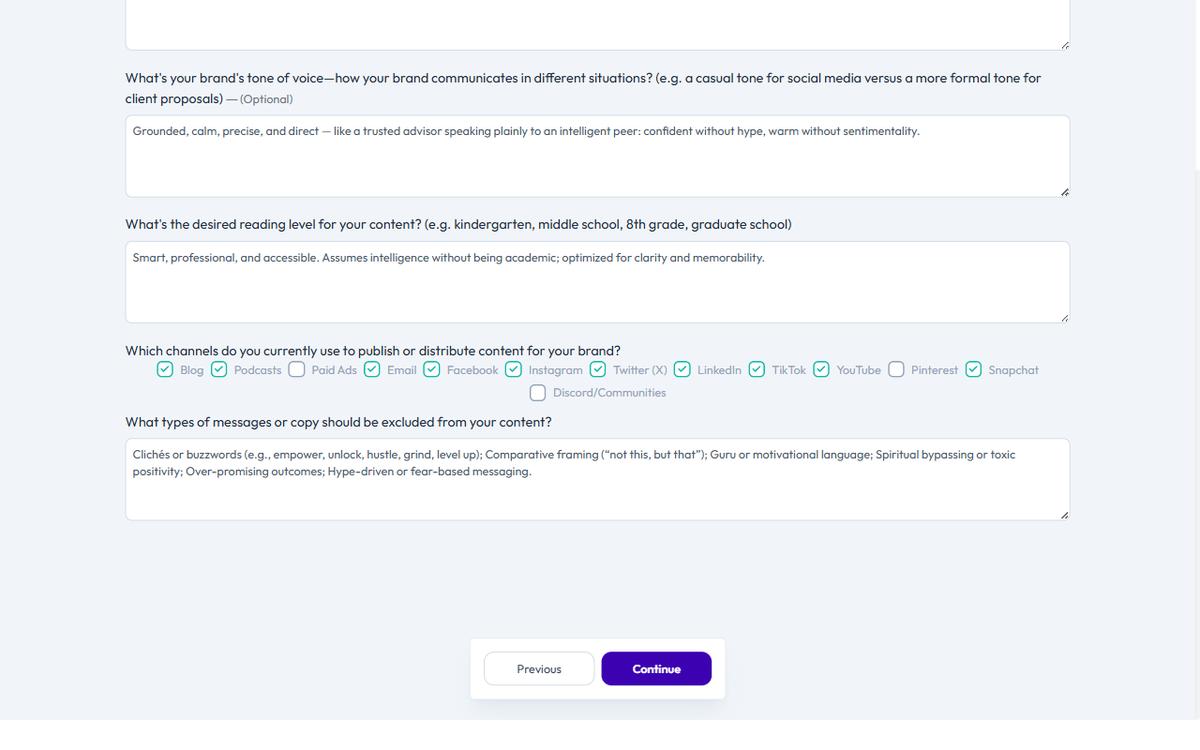
How Content Agent Works Across Channels
When you set up your Brand Profile, you select which distribution channels matter to you. Content Agent generates a daily brief for each channel.
If you selected:
- Blog
- Podcasts
You will receive up to 4 recommendations per day—one for each channel.
Each recommendation:
- Uses a template matched to that channel (e.g., LinkedIn Post for LinkedIn, Long-Form Content for Blog)
- Maintains your brand voice across formats
- Addresses the same audience need but in a format that works for each channel
Available Distribution Channels
Content Agent can generate recommendations for:
- Blog
- Podcasts
- Paid Ads
- TikTok
- YouTube
- Snapchat
- Discord
Configure your channels in your Brand Profile. Content Agent will only generate briefs for the channels you select.
Example: One Topic, Multiple Channels
A real example showing how Content Agent handles multi-channel consistency:
The Topic: Your company released a new feature that solves a customer pain point.
Content Agent generates:
Blog recommendation — Template: Long-Form Content
- Title: "Explain the feature and how it solves the problem"
- Format: 1200-1500 word article with data and use cases
- Purpose: Build authority and long-term search traffic
LinkedIn recommendation — Template: LinkedIn Post
- Title: "Highlight the customer benefit in a professional voice"
- Format: 2-3 short paragraphs with professional tone
- Purpose: Drive engagement with decision-makers
Email recommendation — Template: Email
- Title: "Announce the feature to your subscriber list"
- Format: Short, benefit-focused email with clear CTA
- Purpose: Convert existing audience to feature adopters
TikTok recommendation — Template: Short-Form Video Script
- Title: "Show the feature working in a casual, entertaining way"
- Format: Punchy, visual script (15-30 seconds)
- Purpose: Reach younger audience with authentic tone
The consistency: All four briefs describe the same feature and benefit, but each is shaped for how that channel's audience consumes content.
You customize and generate all four. Your audience hears about the feature everywhere they are, in a format that works for them.
Channel Strategy in Your Brand Profile
Your Brand DNA includes a section for each channel:
- What your audience wants to see on this channel
- What kind of content performs best
- Posting frequency or goals
- Tone or personality adjustments per channel
Content Agent uses this information to tailor briefs. If you note that your LinkedIn audience prefers thought leadership over product updates, LinkedIn briefs will lean that direction.
Generating Content for One Channel
If you only need content for one channel right now, you do not have to use all briefs.
On your dashboard or Content Opportunities page:
- Review all daily briefs
- Select the one or two channels you need
- Ignore the rest
- Generate only what you need
The other recommendations remain available in Content Opportunities if you want to act on them later.
Publishing Across Channels With Consistency
After generating from Content Agent briefs, you have projects for each channel. Before publishing:
- Review each piece — Ensure it fits the final polish your brand requires
- Adjust CTAs if needed — Each channel may have different next steps
- Schedule coordinated publishing — Post all pieces around the same time (with channel-specific timing)
- Track performance per channel — Monitor what resonates on each platform
Coordinating multi-channel publishing prevents message fatigue (everyone sees the same content all at once) while ensuring your audience hears your message no matter where they are.
Channel Configuration
Channels are configured in your Brand Profile (onboarding Step 5) and are not restricted by plan. Any plan can select any combination of the 13 available channels. The channels you select determine which Content Agent recommendations you receive.
Tips for Multi-Channel Success
Tip 1: Start with 3 channels. Do not try to generate content for 10 channels at once. Pick the 3 channels where your audience is most active, generate those briefs, and expand later.
Tip 2: Customize per channel. Even though briefs are generated for different channels, use customization to add channel-specific nuance. A LinkedIn post needs different language than an Instagram caption.
Tip 3: Repurpose strategically. If you are low on time, generate a blog post and repurpose it across channels (shorter version for LinkedIn, even shorter for Twitter). Use the Repurpose Content project type for this.
Tip 4: Review channel performance. After publishing across channels, track which channel drives the most engagement. Adjust your channel strategy in Brand Profile to focus on your best performers.
Tip 5: Respect channel norms. Each platform has its own culture and unwritten rules. A tone that works on TikTok will feel wrong on LinkedIn. Use customization to match the audience and platform expectations.