

Appearance
Content Agent Not Working
Returns "Error Loading Recommendations"
Direct Answer: The Content Agent can't fetch recommendations due to incomplete Brand DNA or server issues.
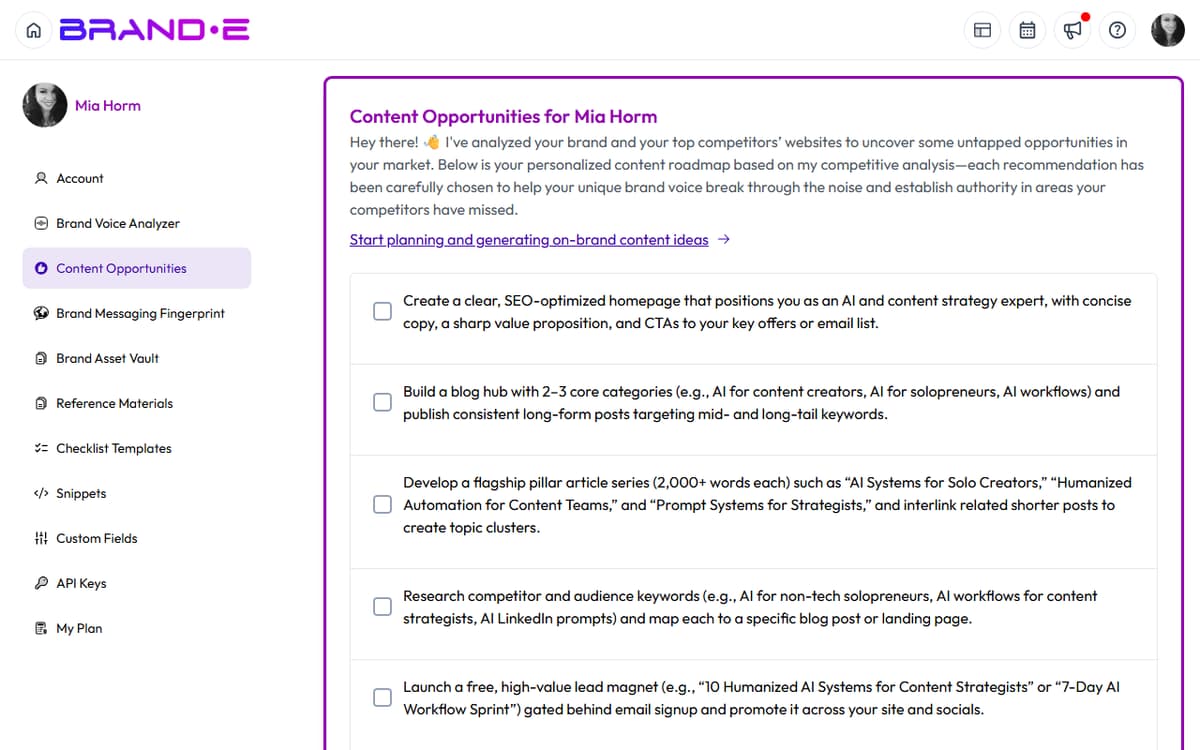
How to Fix This
Complete your Brand DNA
- Go to Brand Settings
- Fill in all required fields: Brand Voice, Tone, Core Values
- Add audience information
- Incomplete Brand DNA prevents recommendations from generating
Verify the agent is enabled
- Go to Account Settings > Features
- Confirm "Content Agent" is enabled
- If disabled, contact support to enable it for your plan
Check your subscription
- Content Agent requires Growth or Agency plan
- Verify your current plan includes this feature
- Content Agent is disabled during the trial period
Refresh the page
- Reload the browser to clear stale data
- Sometimes temporary server issues resolve on refresh
If This Doesn't Work
- Clear browser cache — Settings > Privacy > Clear Browsing Data
- Try a different browser — Safari, Firefox, Edge
- Wait and retry — Server load during peak hours (9am-5pm) can cause slowness
- Contact support — Provide your Brand DNA details so we can debug
Shows "No Recommendations Available for Today"
Direct Answer: The agent has already generated its daily limit of recommendations, or your Brand DNA is missing important context.
How to Fix This
Check the date
- Recommendations reset at midnight in your timezone
- You might have hit today's limit; check back tomorrow
Enhance your Brand DNA
- Add target audience information
- Include industry/niche details
- Add brand voice examples with tone
- Richer Brand DNA produces better recommendations
Verify your plan
- Creator plan: no Content Agent access
- Growth plan: unlimited recommendations
- Agency plan: unlimited recommendations
- Trial accounts: Content Agent is disabled during trial
Manually create content instead
- Use the Generate Content feature directly
- You're not limited by the agent's quota
- Create your own prompts for unlimited generation
If This Doesn't Work
- Contact support — We can reset your daily quota if needed
- Check the time — Recommendation reset happens at midnight; not instantly at noon
Recommendations Appear But Say "Something Went Wrong"
Direct Answer: A recommendation failed to generate fully. Individual failures don't indicate a system error; try generating the recommendation manually.
How to Fix This
Click the failed recommendation
- Some recommendations generate correctly even if they show an error badge
- Open it to see if content is actually there
Generate content manually
- Copy the recommendation's topic/title
- Go to Create Content and generate it directly
- You'll have full control over length and tone
Review the recommendation topic
- If the topic is too vague, the agent couldn't generate it
- Edit your Brand DNA to be more specific
- Retry tomorrow with updated guidelines
Check your API quota
- Some plans have generation limits
- Verify you haven't exceeded your monthly credits
- Upgrade to add more quota
If This Doesn't Work
- Try again later — Temporary server issues can cause individual failures
- Submit the recommendation topic — If a specific topic always fails, contact support
- Disable and re-enable the agent — Go to Settings > Features and toggle off/on
Agent Is Disabled or Grayed Out
Direct Answer: Your plan doesn't include the Content Agent, or the feature hasn't been enabled for your account.
How to Fix This
Check your plan type
- Go to Account Settings > My Plan
- Content Agent is included in Growth and Agency plans
- Creator plan and trial accounts don't have access
Upgrade to a plan that includes it
- Growth or Agency plan includes Content Agent
- Cost: Check the Billing page for current pricing
- Upgrade takes effect immediately
Contact support if you should have access
- Enterprise or special accounts may need manual enablement
- Support can verify your plan and enable the feature
Enable the feature in your account
- Go to Account Settings > Features
- If Content Agent is listed but disabled, enable it there
- Refresh after enabling