

Appearance
Organize Content at Scale
Managing dozens—or hundreds—of projects requires structure. Folders, statuses, and calendars are your tools for staying organized when volume grows fast.
Structure for high-volume creation
If you're creating many projects monthly:
Use folders heavily. Create a folder structure that mirrors your workflow:
- By month: "January 2026", "February 2026"
- By campaign: "Black Friday Campaign", "Product Launch"
- By channel: "Blog Posts", "Social Media", "Email"
- By team: "Sarah's Content", "Marketing Team"
- By client: "Client A", "Client B" (if agency)
Review and refresh your folder structure quarterly. Archive old months or campaigns to keep active folders clean.
Leverage project statuses. Status filters help you find what needs attention:
- Planning + Brief: Early-stage content needing work
- Draft + Review: Content in active development
- Approved: Signed off and ready to publish
- Published + Archived: Completed and historical
At a glance, you know how much is in each pipeline stage.
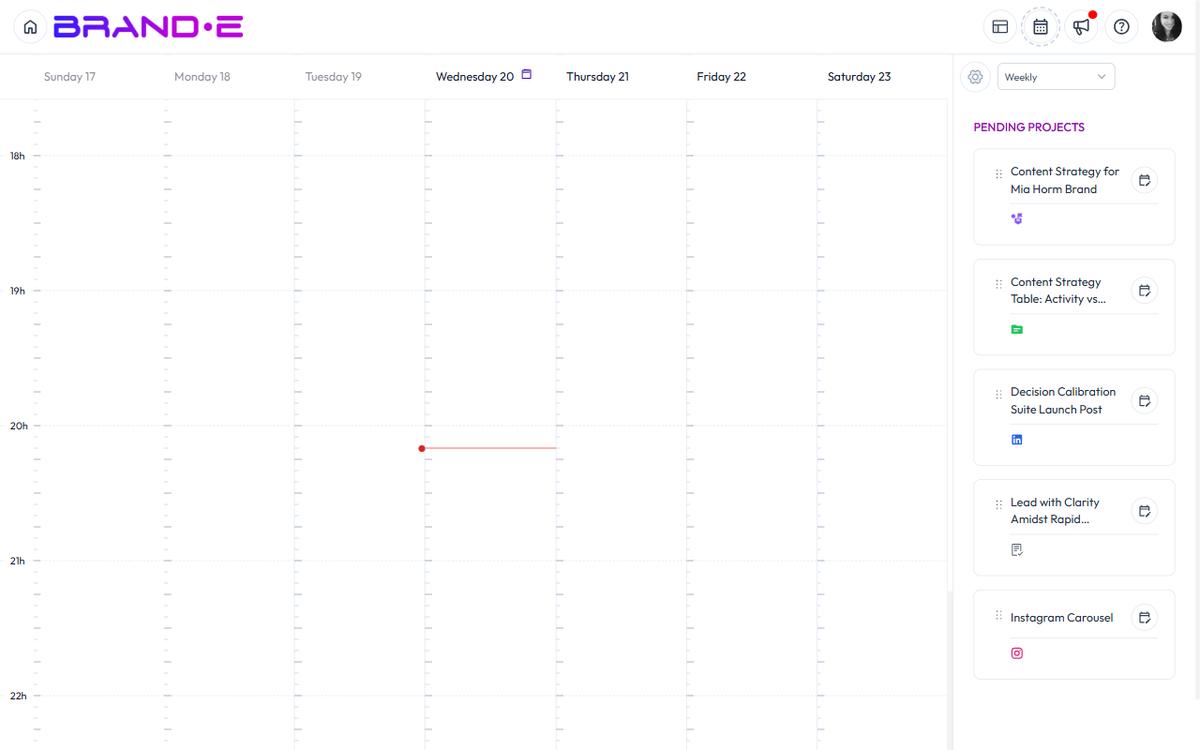
Use the Content Calendar. Plan publishing schedule:
- Drag projects onto the calendar to schedule them
- Weekly, Monthly, or Quarterly views
- See what's coming and avoid gaps
- Adjust timing without changing the project
Finding what you need fast
With hundreds of projects:
Project Search (Modifier+Shift+P) becomes essential:
- Search by name, type, or creator
- Filter by status, folder, date, template
- Find any project in seconds
- No need to navigate through folders
Custom fields add metadata you search on:
- Client name (for agencies)
- Campaign name
- Stakeholder or approver
- Content theme or topic
- Performance metrics (views, engagement, etc.)
Set up custom fields that matter to your workflow, then filter by them.
Approval workflows at scale
If clients or stakeholders review before publishing:
- Create projects in Draft status
- Move to Review status when ready for feedback
- Use Comments for feedback threads (instead of email)
- Enable project approval (plan feature) to gate publishing
- Move to Approved status when signed off
- Publish via integrations when ready to go live
This keeps everything in Brande.ai instead of scattered across email threads.
Publishing at scale
If you publish to multiple channels:
Use publishing integrations:
- Set up integrations for Instagram, LinkedIn, Facebook, Twitter/X, WordPress, Google My Business, HubSpot
- Publish one project to multiple platforms at once
- Schedule posts for consistent cadence
- Track which posts published where
Schedule via Content Calendar:
- Plan your month on the calendar
- Drag projects to dates
- Let Brande.ai publish automatically at scheduled times
- No manual posting needed
Agency-specific organization
If you manage multiple brands or clients:
Create one brand per client:
- Each brand has its own folder structure
- Separate project list per brand
- Team members assigned to specific brands
- Clear boundaries between client work
Use folders for campaign phases:
- Client Review (draft waiting for approval)
- Approved (ready to publish)
- Published (live content)
- Archived (completed campaigns)
Set up custom fields:
- Client name
- Campaign phase
- Budget or performance target
- Approval stakeholder
This scales to dozens of concurrent client projects.
Preventing chaos
Best practices when managing at scale:
Archive, don't delete:
- Mark projects "Archived" instead of deleting
- Keeps history intact
- Removes them from active view
- Recoverable if needed later
Naming conventions:
- Use consistent project naming: "[Client] [Date] [Type]"
- Example: "Acme Q2 Blog Post 1" (clear and searchable)
- Avoid generic names like "Post 1" or "Draft"
Folder limits:
- Keep active folders under 20-30 projects each
- Organize subfolders if one category gets too large
- Archive completed campaigns monthly
Regular cleanup:
- Monthly: Review and archive old drafts
- Quarterly: Update folder structure if needed
- Yearly: Archive entire seasons or years
Scaling team collaboration
As your team grows:
Assign roles clearly:
- Content creators (write in drafts)
- Reviewers (add comments, approve)
- Approvers (clients or stakeholders)
- Publishers (have integration credentials)
Use project approval:
- Brand owner approves before publishing
- Prevents premature or incorrect posts
- Creates audit trail of who approved what
Comments for feedback:
- Collaborators comment on projects
- Threaded conversations stay in context
- No email required
- Builds knowledge base over time
Share with collaborators:
- Invite team members to your brand
- Set read-only access for clients (client collaborator role)
- Different team members see different views based on role
When organization breaks down
If you find yourself:
- Lost in folders unable to find projects
- Publishing wrong versions
- Missing approval deadlines
- Duplicate project creation
Reset your system:
- Archive all old content from last quarter
- Rebuild folder structure for current month
- Set up consistent naming
- Add status filters to your workflow
- Train team on the new system