

Appearance
How To Use Content Agent
You spend 30 minutes planning what to write, then another 30 minutes writing it—only to realize you skipped what actually matters to your audience. Content Agent collapses that planning phase into a daily brief.
How It Works
Content Agent is a strategic intelligence layer that runs once per day. It:
- Analyzes your Brand DNA — Your business objectives, audience, brand voice, and content channels from your profile.
- Scans your context — Your website, existing content, competitors, and industry trends.
- Recommends what to create — Delivers a daily brief with a specific title, summary, and template for each content opportunity.
- Stays brand-aligned — Every recommendation connects back to your Brand DNA and goals—no generic suggestions.
Each brief includes:
- A clear title describing what to create
- A summary explaining why it matters
- A template pre-selected for the right content channel
- Template variables pre-filled with brand context
You are not prompting an AI. You are executing a strategy that already understands your brand.
What You'll Need
- A completed Brand Profile with business objectives, audience definition, and at least one content channel selected. Content Agent will not generate recommendations until these are in place. See Complete Your Brand Profile.
Getting Started
Step 1: View Today's Recommendations on Your Dashboard
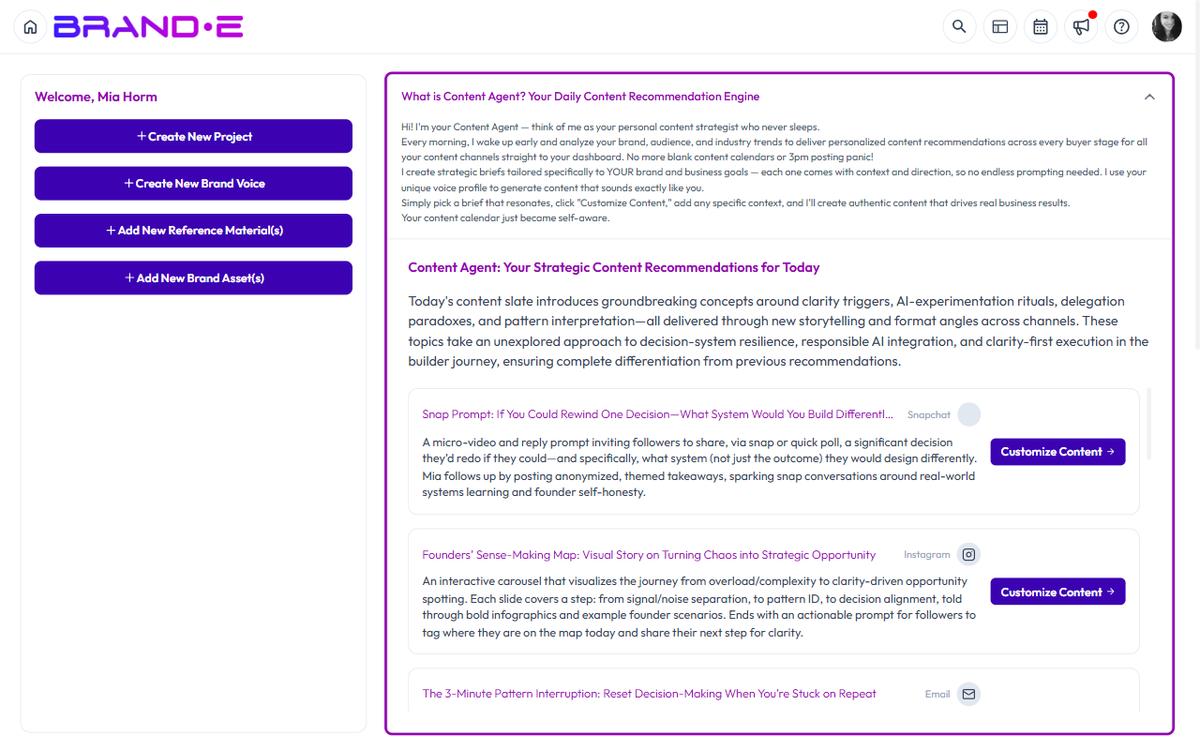
When you log into Brande.ai, the dashboard displays today's Content Agent recommendations in the main widget labeled "Content Agent: Your Strategic Content Recommendations for Today".
The widget shows:
- A summary of today's content strategy brief
- A list of 3-5 recommendations, each tied to a specific channel
- A channel icon and name for each recommendation
- A button to either customize or view the project
Step 2: Choose a Brief That Resonates
Content Agent recommends multiple briefs across your channels. You do not need to act on all of them. Read the summaries and select the ones that align with your current priorities or what your audience needs right now.
Step 3: Customize Before Generating
Click "Customize Content" on any recommendation. A dialog opens where you can:
- Review the template variables (pre-filled with brand context)
- Add any specific context or angle for this piece of content
- Modify any variables that don't quite fit
Once customized, click "Generate" to create the content.
Step 4: Save and Organize
After generating, your content becomes a project in your workspace. You can:
- Move it into a folder by dragging it in the sidebar
- Edit, refine, or regenerate it
- Share it with team members or clients for review
- Publish it to your channel
Common Use Cases
Use Case 1: Daily Content Planning Start your day on the dashboard. Review the Content Agent recommendations. Pick the one that fits your calendar. Customize it, generate, and you've planned your day's content in under 5 minutes.
Use Case 2: Multi-Channel Consistency Content Agent delivers recommendations for Blog, LinkedIn, Email, and Podcasts all in one place. Generate one brief for multiple channels and ensure consistency across platforms.
Use Case 3: Agency Multi-Brand Management Switch between client brands using the profile dropdown. Each brand has its own Content Agent logic and daily briefs. Manage 5 brands without mixing voices or channels.
Use Case 4: Unblock Blank-Page Anxiety Instead of "What should I write today?" Content Agent answers "Here's what your audience needs to hear right now." The strategy is already done—you're just executing.
Tips for Best Results
Tip 1: Refresh Your Brand Profile Monthly Content Agent learns from your Brand DNA. If your product, audience, or goals change, update your profile so recommendations stay relevant.
Tip 2: Use the Customize Step The template variables are educated guesses based on your brand context. Use customization to add nuance, recent news, or a specific customer story that makes it your own.
Tip 3: Act on Multiple Channels If Content Agent recommends a blog post and a LinkedIn post on the same topic, generate both. Multi-channel repetition builds audience awareness without requiring extra planning.
Tip 4: Track What Works After publishing, come back to the brief that generated it. Mental note what types of topics and channels drive the most engagement. Content Agent improves over time when you establish patterns.
Limitations
Content Agent is not a writing tool. It generates strategy briefs and template recommendations, not finished content. You must click "Customize Content" and then generate to create the actual article, post, or email.
Content Agent requires full brand onboarding. If your Brand Profile is incomplete (missing channels, business objectives, or audience definition), the dashboard will show a prompt to complete setup instead of recommendations.
Content Agent generates one set of daily recommendations per brand. It does not generate multiple recommendations per day per channel. One daily brief = one opportunity per distribution channel selected.
Content Agent respects your subscription plan. Some plans include limited recommendations. If you've reached your limit, the widget shows "Disabled" and a message to upgrade.
What Happens Next
Content Agent is now part of your daily workflow. Every morning, your dashboard shows what your brand should say today — based on your strategy, not a generic prompt.