

Appearance
Request New Features
Have an idea that would make Brande.ai better?
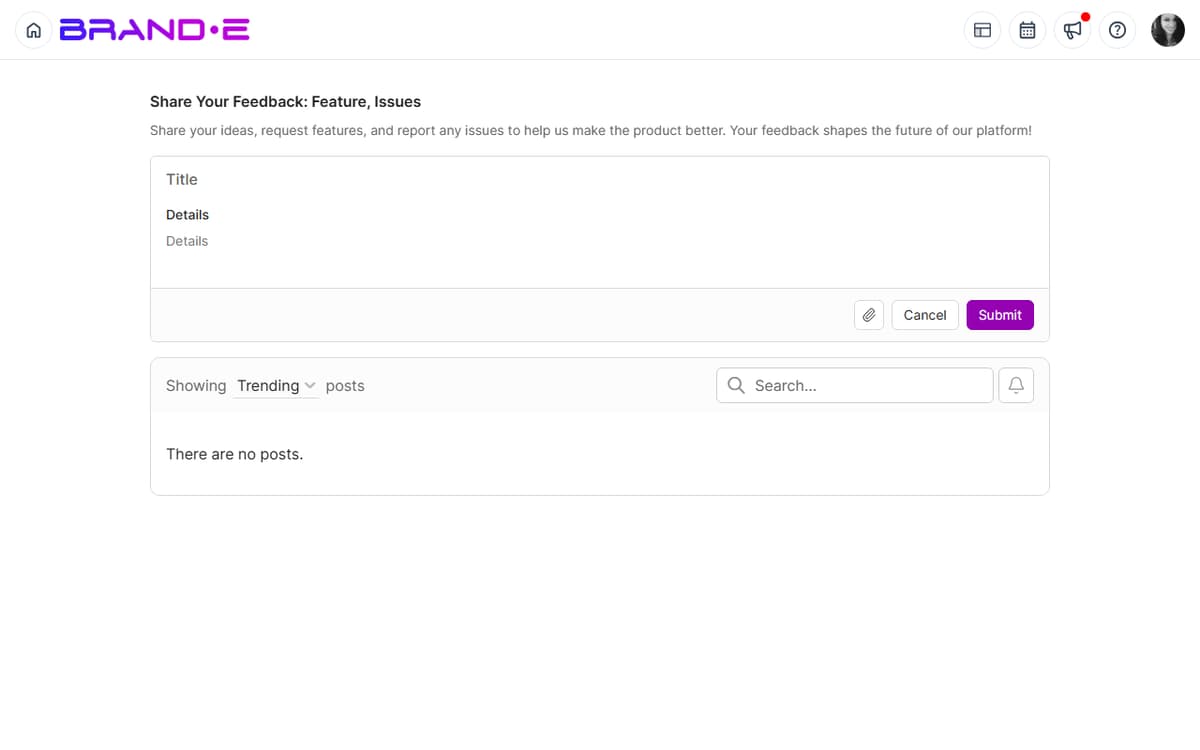
Submit a feature request and watch the community vote on it. The most-requested features make it to the development roadmap.
What's a Feature Request?
A feature request is feedback asking for something new or improved.
Examples:
- "Add ability to schedule posts to go live at specific times"
- "Let me filter projects by team member to see who's working on what"
- "Create a 'favorites' feature to mark my most-used templates"
- "Add Slack integration to post updates when projects are approved"
- "Allow multiple approvers on one project (sequential approval workflow)"
Submit a Feature Request
Feature requests go through the same feedback form as other feedback.
To Request a Feature:
Open Help Center (profile icon > Help)
Click "Give Feedback" → "Share Product Feedback"
Fill in the form:
- Title: Clear, short description of the feature
- Description: Explain what problem it solves and why you need it
- Category: Select the relevant area (e.g., "Collaboration", "Projects", "Calendar")
- Priority: How important is this to you?
- Attachments: Add a sketch, screenshot, or mockup if helpful
Click Submit
Your feature request is posted to the public feedback board
Writing Effective Feature Requests
Be Specific
- Bad: "Make the app better"
- Good: "Add ability to bulk-assign multiple projects to a folder at once. Currently I have to open each project individually, which takes 20 minutes when I have 50+ projects per month."
Explain the Problem
- Bad: "I want dark mode"
- Good: "I work late into the evenings and dark mode would reduce eye strain. I notice most design tools have dark mode built-in."
Show the Impact
- Bad: "Would be nice to have email scheduling"
- Good: "I spend 2 hours per week scheduling emails across multiple client accounts. Native scheduling would consolidate this to one place and save time daily."
Describe How You'd Use It
- Bad: "Add better search"
- Good: "I'd like to search for projects by client name, not just project title. For example, search 'Acme Corp' to see all projects related to that client across all brands."
Consider the Scope
- Small features (e.g., "Add a 'Copy' button to projects") are more likely to ship
- Large features (e.g., "Completely redesign the dashboard") take longer but are appreciated if demand is high
Common Feature Request Categories
Workflow and Process
- Bulk operations (bulk delete, bulk assign, bulk status change)
- Keyboard shortcuts for common tasks
- Project templates and workflows
- Automation (auto-save, auto-notifications)
Visibility and Organization
- Project filtering and search
- Sorting options (by date, status, team member)
- Project grouping (by client, channel, folder)
- Dashboard customization
Collaboration
- Sequential approval workflows (approval #1, then #2)
- Comments and feedback on projects
- @mention notifications for team
- Activity logs and audit trails
Integration and Connection
- Integrations with external tools (Slack, Monday.com, Asana)
- Webhook support
- API enhancements
- Import/export capabilities
Personalization
- User preferences and defaults
- Theme customization (colors, fonts)
- Notification preferences
- Workspace branding
Upvoting Feature Requests
You don't just submit features—you advocate for others' ideas too.
To Upvote a Feature:
- Go to the feedback board (Help Center > Give Feedback, or navigate to /feedback)
- Browse or search for ideas you support
- Click Upvote or +1 button
- Your vote is recorded
Why Upvote?
- Highly-voted features get built first
- The team prioritizes by demand
- Your upvote shows the team you want this feature
- You help shape the product roadmap
Upvote Strategy:
- Upvote features you'll actually use
- Upvote features that solve problems for many people
- Upvote features that would save you time
Tracking Your Feature Requests
After You Submit:
- You receive a confirmation email with a link to your request
- Your request appears on the public feedback board
- Other users can upvote and comment
- The status shows: Under Review, Planned, In Progress, Shipped, Closed, or Duplicate
Check Status Regularly:
- Go to Help Center > Give Feedback
- Look for "My Feedback" or "Your Submissions" tab
- See the status and upvote count of each request
Watch for It to Ship:
- Status changes from "Planned" to "In Progress"
- A date appears: "Shipping in [month]"
- The feature ships
- Status changes to "Shipped"
- A changelog entry documents the new feature
- You get a notification
Feature Request Best Practices
One Feature Per Request Submit separate requests for different features. It's easier for the team to prioritize and for others to upvote what they want.
Add Context and Use Cases Include real-world scenarios: "I manage 3 client brands. When I switch brands, I lose track of which projects are due today across all brands. A unified calendar view would solve this."
Consider Technical Feasibility Some features are harder to build than others. The team will provide estimates, but generally:
- Small UI additions are fast
- New integrations take longer
- Complete redesigns take the longest
Engage with Comments If someone comments on your feature request, respond. Discuss how it could work and why it matters. This helps the team understand the value.
Link to Related Features If your request builds on another request: "This is related to [Request #456] about project bulk operations"
Be Patient Great features take time. Your feature might:
- Ship in 2 weeks (small, high-demand features)
- Sit in "Planned" for 6 months (good idea, not highest priority)
- Not ship at all (low demand or doesn't fit product vision)
No outcome is failure—you still influenced the product.
What Happens to Feature Requests
Shipped Your request became a feature. You influenced the product.
Planned The team decided to build this. It's on the roadmap.
In Progress The team is actively building it. It will ship soon.
Under Review The team is considering it. Might become planned if demand is high enough.
Duplicate Your request is similar to an existing one. They've been merged. The original request gets the combined upvotes.
Closed The team decided not to build this. Reasons usually include:
- Low demand (not enough upvotes)
- Doesn't fit product vision
- Technically infeasible
- Better alternative exists
Wontfix The team has decided this won't be built. If you disagree, comment on the request and explain why it's important to you.
Feature Request Examples
Example 1: Bulk Operations
Title: "Bulk assign multiple projects to folders"
Description: "When I create 10+ projects at the start of a sprint, I manually open each one and assign it to a folder. This takes 20+ minutes. If I could select multiple projects and drag them to a folder (or right-click > assign to folder), it would save significant time."
Category: Projects & Organization
Impact: Medium (saves time, affects many users)
Likelihood of Shipping: Medium (moderate scope, high demand)
Example 2: Integration
Title: "Slack integration for project approvals"
Description: "When a client approves a project in Brande.ai, I could receive a Slack notification with a direct link to the approved project. This would let me immediately publish without logging in to Brande.ai."
Category: Integration
Impact: High (improves workflow efficiency)
Likelihood of Shipping: Medium (integration builds require platform coordination)
Example 3: Workflow
Title: "Sequential approval workflows (primary + secondary approval)"
Description: "For critical projects, I want two approvals: first from the client, then from our legal/compliance team. Currently I can only track one approval. Sequential approvals would enforce this process."
Category: Collaboration
Impact: High (improves governance)
Likelihood of Shipping: Medium-High (complex feature, clear demand from agencies)
Troubleshooting
Q: I submitted a feature request but don't see it on the board. A: It may take a few minutes to appear. Refresh the page. If it still doesn't appear after 10 minutes, contact support.
Q: Can I edit my feature request after submitting it? A: Editing depends on the Canny.io board's settings. If editing isn't available, add a comment to your post to clarify or extend your request.
Q: My feature request was closed. Can I appeal? A: Yes. Comment on the closed request explaining why it's important. The team will reconsider if new information changes the calculus.
Q: How long does it take to ship a feature? A: Highly variable:
- Small features: 2-4 weeks
- Medium features: 1-3 months
- Large features: 3-6+ months
Demand (upvotes) affects priority. More upvotes = faster development.