

Appearance
Customize a Content Brief Before Generating
The customization step is where a Content Agent brief becomes your content strategy. You review the pre-filled variables, add context, and ensure the brief fits your current situation before generating.
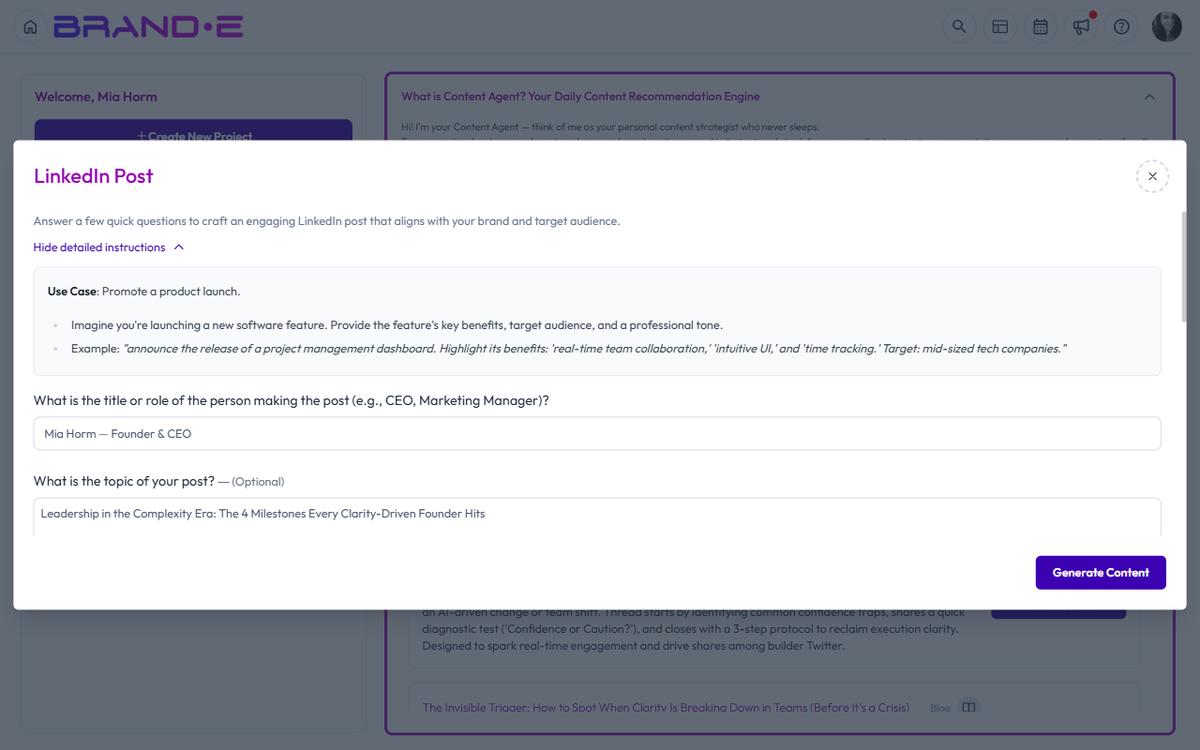
Open the Customization Dialog
From the dashboard or Content Opportunities page, click "Customize Content" on any recommendation.
A dialog opens showing:
- The recommended template
- All template variables
- Fields for you to review and edit
- A "Generate" button to create the content
Review Template Variables
Template variables are pre-filled with context from your Brand DNA. Review each variable to confirm it is accurate for this piece of content.
Common variables include:
- Brand positioning — How you describe your value to the market
- Target audience pain points — The challenges your audience faces
- Key differentiator — What makes you different
- Call to action — Where you want the audience to go next
- Tone or brand voice indicators — Emotional style, personality traits
If a variable is not quite right, edit it. Your changes apply only to this piece of content, not your Brand Profile.
Add Context-Specific Details
The template variables provide the foundation. Layer in details specific to this content moment:
Add a Recent Win or Example
If the brief recommends a case study, add the specific customer name and measurable result you want highlighted.
Reference Current Trends
If the brief recommends thought leadership on a trending topic, add the specific trend, statistic, or news event you want to address.
Specify Your Angle
If multiple approaches exist, clarify which one you prefer. Example: "Focus on the ROI angle, not the time-savings angle."
Include Calls to Action
Customize the call to action to match your current marketing priorities. Example: "Direct readers to sign up for the webinar, not the free trial."
Edit Before Generating
All fields in the customization dialog are editable. You can:
- Change any variable value
- Add new information
- Remove information that does not apply
- Clarify tone or intent
The variable dialog is fully editable: every variable defined on the underlying template appears as an input. Brande.ai pre-fills the fields based on the recommendation's brief (so you start with sensible defaults), but you can rewrite any field before clicking Generate.
Generate Your Content
Once you are satisfied with the customized brief, click "Generate".
Brande.ai will:
- Use the template you customized
- Apply your customized variables
- Generate content in your brand voice
- Create a project in your workspace
The output is ready for review, refinement, or publication.
Common Customization Scenarios
Scenario 1: The Brief is Too Generic
The variable is accurate but the recommended content angle is too broad for your audience right now.
Action: Edit the summary or add context in the variables field to narrow the focus. Example: "Instead of general tips, focus specifically on what e-commerce brands should do, not B2B SaaS."
Scenario 2: You Have a Specific Customer Story to Use
The brief recommends a case study, but you want to feature a particular customer.
Action: Edit the customer-related variables to name the specific customer, their measurable result, and their industry. Brande.ai will weave these into the content.
Scenario 3: The Recommended Channel Does Not Match Your Calendar
Content Agent recommends LinkedIn, but you are overstocked on LinkedIn posts this week and need a blog post instead.
Action: Change the template from LinkedIn Post to Long-Form Content and re-customize the variables to fit a blog format. The underlying strategy remains the same, just in a different format.
Scenario 4: You Want to Combine Two Briefs
Content Agent recommends two briefs on related topics. You want to combine them into one longer piece.
Action: Customize the first brief and add variables from the second brief. Write a note in the custom context field explaining the combined angle.
Tips for Effective Customization
Tip 1: Customize for specificity, not completeness. Content Agent fills in 80% of the context. Customization is your 20% that makes it specific to your situation right now.
Tip 2: Change variables, not tone. The template and variables drive tone and brand voice automatically. Focus customization on what the content says, not how it sounds.
Tip 3: Save time by using pre-filled variables. If a variable is already accurate, leave it as-is. Only edit what needs adjustment.
Tip 4: Use customization to test a new angle. If you want to test a different messaging approach, customize the variables to test it. If results are good, update your Brand Profile for future recommendations.