

Appearance
Use Brand Voice Profiles in Projects
You have one Brand DNA but multiple voices. Your CEO voice is different from your CMO voice. Your founder vulnerability differs from your marketer authority. Brand Voice profiles let you generate content in different voices—all aligned to your Brand DNA, all authentic to your people, all publishable under your brand.
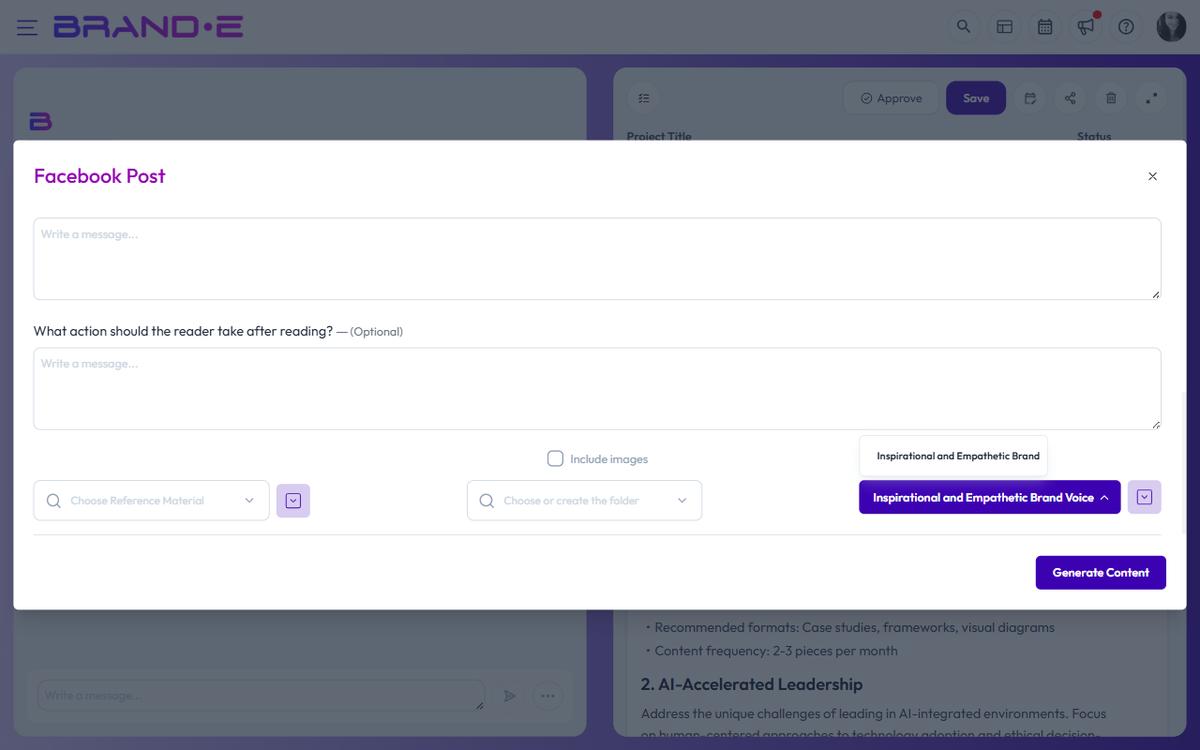
Without voice selection, every post sounds the same. With voice selection, your audience hears multiple authentic perspectives that add dimension to your brand narrative.
What Is a Brand Voice Profile?
A Brand Voice profile is a specific personality or perspective created from voice examples, tone guidelines, and communication preferences. It answers: "How does [person] communicate about [topic]?"
Example Voice Profiles for a SaaS Startup:
- Founder Voice — Vulnerable, story-driven, strategic
- CMO Voice — Data-focused, marketing-sharp, benefit-oriented
- Product Voice — Technical-accurate, user-focused, implementation-detail
- Customer Success Voice — Supportive, problem-solving, empathetic
Each voice is distinct but aligned to the overall Brand DNA. An audience member reading any voice post still recognizes the brand.
Where Brand Voice Selection Appears
Brand Voice selection is available when creating a new project, if the template allows it.
Some templates hide Brand Voice selection:
- Templates with
hide_brand_voice_selection: truedo not show the voice dropdown - These templates use a fixed voice or default voice
Templates that show voice selection:
- LinkedIn Post
- Long-Form Content
- Website Copy
- Write from Scratch
- Repurpose Content
- Ideation
Templates without voice selection:
- Ask Brande.ai
- Certain specialized templates (varies by plan)
How to Create a Brand Voice Profile
Brand Voice profiles are created and managed in your Brand Profile page (Account sidebar > Brand Profile, brand owner only).
To create a new voice:
- Navigate to Account (top right user menu)
- Click Brand Profile in the sidebar
- Scroll to Brand Voices
- Click Create New Voice (or similar button)
- Provide:
- Voice Name — Example: "Founder Voice," "CMO Voice"
- Description — Example: "Personal, vulnerable, strategic perspective from our founder"
- Voice Examples — Paste or upload content that demonstrates this voice
- Existing social posts
- Email samples
- Interview transcripts
- Video transcripts
- Tone Guidelines — Specify how this voice communicates
- Word choice (formal, casual, technical, etc.)
- Sentence length (short and punchy, or long and narrative)
- Story vs. data ratio
- Emotional tone (vulnerable, authoritative, playful, etc.)
Brande.ai analyzes the examples to extract the voice personality, then applies it to all content generated with that voice selected.
Select Brand Voice When Creating a Project
When you create a new project with a template that supports voice selection:
In the New Project Dialog
The New Project dialog title is "Choose your project type." No voice selection here—that comes next.
In the Variables Dialog
After selecting a template, the variables dialog opens with:
Brand Voice Dropdown (unless hidden by template)
- Label: Current selection (e.g., "Founder Voice")
- Default: Your first/primary voice
How to select a voice:
- Click the Brand Voice dropdown button
- Browse available voices
- Click a voice to select it
- Button label updates to show your selection
Available voices:
- Only voices your brand has created
- Typically includes a "Default" or "Primary" voice
- Custom voices you've created (e.g., "CMO Voice," "Product Voice")
What if no voice is selected? The system uses your primary/default voice automatically.
What Happens When You Select a Voice
Once you select a Brand Voice:
- The AI reads the voice examples — Extracts personality, tone, writing patterns
- AI applies voice to generation — All content matches that voice's personality
- Content respects Brand DNA — Voice is distinct but still aligned to business objectives and audience
Result: Content that sounds like [voice person] speaking to your audience about your brand.
Example: Same Topic, Different Voices
Topic: "Why hiring for culture fit matters"
Founder Voice: "I learned this the hard way. My first hire had perfect credentials and zero fit. We lasted 8 months before the culture clash got too big. Now I interview for fit first, credentials second. Here's why..."
CMO Voice: "Culture-fit hiring increases 2-year retention by 40%. The ROI is clear: lower turnover costs = higher team productivity. Yet 70% of hiring managers prioritize experience over culture. Here's where they're leaving money on the table..."
Product Voice: "Culture fit determines how quickly someone can contribute to our product development workflow. When values align, onboarding is 50% faster, decision-making is clearer, and shipping velocity increases. Here's how we assess fit..."
Customer Success Voice: "Your customers experience your team before they experience your product. Hire people who care about customer success the way they care about themselves. This builds teams that support, not just sell. Here's what we look for..."
Same topic. Four different authentic voices. All Brand DNA–aligned. Each appeals to a different part of your audience.
Tips for Effective Voice Selection
Tip 1: Create 2–3 core voices, not 10 You can have multiple voices, but maintain 2–3 as your core. More voices create inconsistency. Fewer voices are easier to manage.
Tip 2: Make voices distinctly different "CEO voice" and "COO voice" are too similar. Better: "Founder vulnerability voice" and "Data-driven marketing voice." The difference should be obvious.
Tip 3: Voice should match the publishing person If your founder writes LinkedIn posts, use "Founder Voice." If your CMO writes blog posts, use "CMO Voice." Alignment builds audience trust.
Tip 4: Update voice examples quarterly As your brand voice evolves, refresh the voice examples in your Brand Profile. New examples keep the AI's understanding current.
Tip 5: Test voice performance Track which voices get higher engagement on LinkedIn or blog posts. Double down on what resonates with your audience.
Tip 6: Default voice for brand consistency If unsure, select your "default" or "primary" voice. This ensures baseline consistency when multiple people create content.
Voice Selection in Collaborative Teams
If your team creates content together:
Assign voices to people:
- Sarah (CMO) → Always uses "CMO Voice"
- Alex (Founder) → Always uses "Founder Voice"
- Jordan (Product) → Always uses "Product Voice"
This creates predictable voice patterns. Your audience knows who's speaking based on the voice.
Brand owner manages voices: Only brand owners can create or edit Brand Voice profiles. Other team members can select voices when creating projects, but cannot modify voices.
Cross-check voice alignment: Periodically review published content. Does Sarah's "CMO Voice" posts align with the voice guidelines? If not, request voice example updates.
When NOT to Select a Different Voice
Don't switch voices for the same piece of content: One LinkedIn post = one voice. Don't ask the AI to "rewrite this in Founder Voice" after generating in CMO Voice. Create a separate project with the correct voice instead.
Don't use voice selection as a workaround for weak Brand DNA: Voice selection enhances existing Brand DNA. If your Brand DNA is unclear or misaligned, fixing that matters more than voice selection.
Don't create a voice for every person: Founder, CMO, and one product voice = manageable. 8 different voices = confusing. Keep it focused.
Troubleshooting Voice Selection
"The content doesn't sound like the voice I selected" → Update the voice examples in your Brand Profile. The AI learns from examples. Old/weak examples produce weak voice matching.
"Two voices sound too similar" → Edit the voice descriptions to be more distinct. Example: Instead of "Marketing Voice" and "Sales Voice," use "Data-Driven Marketing Voice" and "Relationship-First Sales Voice."
"I don't see the Brand Voice selector" → That template hides voice selection (check template details). Use a different template that supports voices, or ask your team to enable it.
"Content generated in the wrong voice" → The wrong voice was selected. Create a new project with the correct voice. Revision history doesn't change voice retroactively.
Best Practices for Multi-Voice Brands
Best Practice 1: Document voice profiles clearly Create a "Voice Guide" in your Brand Profile describing each voice:
- Name
- Who embodies this voice
- Core traits (3–5 adjectives)
- Example posts
- When to use (which channels/formats)
Best Practice 2: Publish consistently across voices If you publish "Founder Voice" posts on Tuesday and "CMO Voice" on Thursday, your audience recognizes the pattern and leans in.
Best Practice 3: Use voice to add content diversity Instead of generating 4 LinkedIn posts in the same voice, generate 2 in Founder Voice and 2 in CMO Voice. Your feed becomes more interesting.
Best Practice 4: Train collaborators on voice selection When onboarding team members, explain which voice to use for their role and which channels suit that voice.
Voice Selection Workflow
- Create brand voices in Brand Profile (brand owner, one-time setup)
- Create new project (Alt+N or Create New Project button)
- Select template that supports voice selection
- Fill variables dialog
- Select Brand Voice from dropdown
- Click Done → Generation uses selected voice
- Refine in chat if needed (voice stays consistent through refinements)
- Publish with voice attribution (optional: credit which voice in post)